A previous article, cracking Windows passwords, talked about how OS passwords are stored, their security and how we can go about cracking and attacking them using bruteforce technique. This is an important aspect of OS hacking and a very notorious topic. Tools such as Ophcrack and JTR(John The Ripper) are available which can use a password file to find out all the passwords. But there is a problem with them being slow, especially for long or complex passwords (containing numbers or symbols). It is because bruteforce algorithms are always the slowest. Later the article introduced the notion of Rainbow Tables which can significantly speed up the process.
Software tools such as JTR take a string, convert it to the hash and compare it with the hash in the supplied password file. Why not compute all these hashes and store it in a table. Basically the idea in its simplest form is to compute hashes of all the words and store them in a table. This way you do not actually need compute hashes and compare. Instead you can straightaway lookup in a table and find the plaintext corresponding to the given hash value.
So this is a rough definition of a rainbow table. Obviously it is much more complex than this. Rainbow tables can be downloaded from freerainbowtables.com or ophcrack for free. Remember ophcrack tool? You can integrate these tables with it thereby allowing you the flexibility to use either bruteforce or rainbow attack. Or you can straightaway download Ophcrack Live CD which will not require any installation and does the job automatically.
A live CD/DVD contains an OS that can be booted from the disk itself. When you switch on your PC the bios looks for an OS in your hard drive, disk drive or on your network depending on the given order. The order can be changed from the bios options.
Ophcrack has created an OS which comes with the tool as well as the smallest rainbow table. Remember that XP uses LM (lan manager) hashes by default whereas Vista and later OS use NTLM hashing mechanisms. NTLM is a much more secure hashing scheme and its rainbow tables are far more bigger.
Make sure that the boot sequence has Optical Drive above the Hard Drive. Once Opchrack OS has booted ( based on Linux Slack) , it will automatically look for the SAM file in the default directory (C:\Windows\System32) and load them. You can manually search for the SAM file by browsing to /mnt/hda1/Windows/system32/)

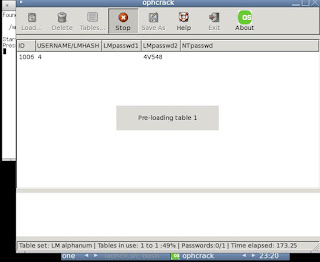
Ophcrack automatically selects the alphanum table and starts cracking! You can find the tables in /mnt/live/ophcrack/tables.
Here is a list of passwords that I tried cracking:
NOTE: I had installed Windows XP(ie LM hashes and the XP free small table from Ophcrack) on VMWare on my 2GHz machine. Results may vary!
anadi - 80s
yellowuzumaki- 47.2s
123goldfish- 523.01s
o1m8shi4v548- 203.78s!
himynameisbobandilovelongpasswords0678- "LM hashes empty" .Remember, all passwords with length greater than 14 are stored as NT hashes.

Issues with a Rainbow table attack
A rainbow table is a classic example of time-memory tradeoff. While you can expect dramatic reduction in time consumed they are quite huge. Moreover they do not guarantee 100 percent success. There are different types of tables depending on the character set you expect the password to have. Vista tables are especially large (around 3GB) which can be annoying if you are planning to download them. Alternately you can have CD/DVD shipped to your home for approximately $50 (rainbowtables.com provides this service).
Rainbow table attack is the most reliable and fast attack to crack Windows passwords. XP is the most popular OS from Windows and is still in use even though Microsoft has disbanded its production and maintenance. Due to its tremendous speed and accuracy rainbow attack is a very big threat.
Prevention of Rainbow Attacks
Salting is a technique which introduces random string in the hashed output. This random string, called a salt, may be a username which may be appended to the password before being hashed. Mathematically something like:
f(password)=HASH(password+salt)
This thwarts the normal rainbow attack because now the hash for a given password will be something different(since right at the end a salt is added). Even if you come to know the salt you will need to re-compile the tables accordingly, which can be a tedious task. Unix based OS use salts and are shielded from this attack, sadly Windows Xp or Vista are not.
The only way to save your a** is if you have a strong password having a few numbers, special characters(maybe add a space or special characters like $ etc) and a long password. A password with length greater than 14 will always be stored as an NT hash.
Enable Bios password so that an attacker cannot modify the boot sequence. Make sure that hard drive comes above CD/DVD drive and USB drive. If your BIOS allows remove optical drive and USB drive from the boot sequence.
Read the basics of password security and cracking
Ophcrack homepage
Rainbowtables.com homepage
Wiki on Password Cracking
Wiki on Rainbow Tables
Wiki On Salting
Rainbow Tables
Software tools such as JTR take a string, convert it to the hash and compare it with the hash in the supplied password file. Why not compute all these hashes and store it in a table. Basically the idea in its simplest form is to compute hashes of all the words and store them in a table. This way you do not actually need compute hashes and compare. Instead you can straightaway lookup in a table and find the plaintext corresponding to the given hash value.
So this is a rough definition of a rainbow table. Obviously it is much more complex than this. Rainbow tables can be downloaded from freerainbowtables.com or ophcrack for free. Remember ophcrack tool? You can integrate these tables with it thereby allowing you the flexibility to use either bruteforce or rainbow attack. Or you can straightaway download Ophcrack Live CD which will not require any installation and does the job automatically.
Opchcrack Live CD
A live CD/DVD contains an OS that can be booted from the disk itself. When you switch on your PC the bios looks for an OS in your hard drive, disk drive or on your network depending on the given order. The order can be changed from the bios options.
Ophcrack has created an OS which comes with the tool as well as the smallest rainbow table. Remember that XP uses LM (lan manager) hashes by default whereas Vista and later OS use NTLM hashing mechanisms. NTLM is a much more secure hashing scheme and its rainbow tables are far more bigger.
Simple Steps to load Ophcrack LiveCD
Make sure that the boot sequence has Optical Drive above the Hard Drive. Once Opchrack OS has booted ( based on Linux Slack) , it will automatically look for the SAM file in the default directory (C:\Windows\System32) and load them. You can manually search for the SAM file by browsing to /mnt/hda1/Windows/system32/)

Ophcrack automatically selects the alphanum table and starts cracking! You can find the tables in /mnt/live/ophcrack/tables.
Here is a list of passwords that I tried cracking:
NOTE: I had installed Windows XP(ie LM hashes and the XP free small table from Ophcrack) on VMWare on my 2GHz machine. Results may vary!
anadi - 80s
yellowuzumaki- 47.2s
123goldfish- 523.01s
o1m8shi4v548- 203.78s!
himynameisbobandilovelongpasswords0678- "LM hashes empty" .Remember, all passwords with length greater than 14 are stored as NT hashes.


Issues with a Rainbow table attack
A rainbow table is a classic example of time-memory tradeoff. While you can expect dramatic reduction in time consumed they are quite huge. Moreover they do not guarantee 100 percent success. There are different types of tables depending on the character set you expect the password to have. Vista tables are especially large (around 3GB) which can be annoying if you are planning to download them. Alternately you can have CD/DVD shipped to your home for approximately $50 (rainbowtables.com provides this service).
Rainbow table attack is the most reliable and fast attack to crack Windows passwords. XP is the most popular OS from Windows and is still in use even though Microsoft has disbanded its production and maintenance. Due to its tremendous speed and accuracy rainbow attack is a very big threat.
Prevention of Rainbow Attacks
Salting
Salting is a technique which introduces random string in the hashed output. This random string, called a salt, may be a username which may be appended to the password before being hashed. Mathematically something like:
f(password)=HASH(password+salt)
This thwarts the normal rainbow attack because now the hash for a given password will be something different(since right at the end a salt is added). Even if you come to know the salt you will need to re-compile the tables accordingly, which can be a tedious task. Unix based OS use salts and are shielded from this attack, sadly Windows Xp or Vista are not.
Using complex and long passwords
The only way to save your a** is if you have a strong password having a few numbers, special characters(maybe add a space or special characters like $ etc) and a long password. A password with length greater than 14 will always be stored as an NT hash.
Enabling Bios Password
Enable Bios password so that an attacker cannot modify the boot sequence. Make sure that hard drive comes above CD/DVD drive and USB drive. If your BIOS allows remove optical drive and USB drive from the boot sequence.
Important Links:
Read the basics of password security and cracking
Ophcrack homepage
Rainbowtables.com homepage
Wiki on Password Cracking
Wiki on Rainbow Tables
Wiki On Salting


