Showing posts with label hack. Show all posts

Tuesday, September 13, 2011

Record/Download Live streaming and streaming videos(Live TV)

Multimedia has become an important part of the Internet nowadays. Consumers have realized that Internet connectivity is as important as a telephone connection and have showed willingness to invest in high bandwidth connection. This has led to a proliferation of rich multimedia websites- youtube is a prime example. Although Youtube and such sites generally offer recorded videos, live streaming is also steadily gaining momentum. Nearly all the Indian news channels provide a link to "live TV" , recently IPL also broadcast their matches live on the Internet. This can pose a problem to the average internet user though.

I was recently enjoying a hot debate aired on Times Now and decided to download it so that I could show it to my friends. Usually the channel will never provide a link to download the live news but that did not hassle me since I had a registered copy of IDM. It is when IDM failed to detect the multimedia stream that I realized that downloading live streaming is not as easy as it seems. I googled around but did not get satisfactory results. Finally I turned to Wireshark and soon it was clear that the news site used a protocol called RTSP(Real Time Streaming Protocol) to serve the content. I tried VLC media player to play the RTSP stream but it simply crashed.

Another round of googling and I found a host of software claiming to download RTSP streams. Most of them were either not able to detect the streaming video or froze. Many failed to work in Vista too. Finally I was able to find a wonderful program called Replay Media Catcher which can not only download and record RTMP streams but also HTTP live streams (like Youtube vids) and RTSP stream. It works pretty well with Vista and has no issues with the infamous Windows UAC feature. There is also a nifty feature which allows you to extract mp3 from the flv files.

After the recording has started you can close the browser since Replay Media Catcher will still download the stream. So now you do not need to sit and watch live tv since you can always record it and play it on your favorite video player, just like a movie, whenever you want to! It will download the stream and store it in a user defined folder.

NOTE: Remember to run Replay Media Catcher first and put it in 'start recording' mode before you browse to a  live streaming site, otherwise the software won't be able to detect the stream and the browser may become unresponsive.

Replay Media Catcher is not a freeware and you may want to try out its trial version or look for it on torrent network!

Interesting Links:


1. Replay Media Catcher Homepage
2. Download Replay Media Catcher
3. Times Now Live TV
4. NDTV Live TV
5. Wiki on RTSP 

Wednesday, September 7, 2011

Run free Google web proxy server

In our college someone or the other is always in a search for the ultimate Cyberoam 'bypasser'- something which is undetectable and can run all kinds of services. For all those unaware of Cyberoam, it is a network security product which (at the simplest level) can block websites and applications deemed harmful by the administration. Our administration has blocked most of the sites including rapidshare, torrent sites and many other. Obviously this can get annoying and frustrating especially when useful sites also get blocked. So far I have tried using simple web based proxy servers on the net(like hidemyass.com etc) as well as advanced VPN services like SecurityKiss and PingFu, but they have not lasted very long. The admin probably finds out by noting high network activity caused by such tunneling solutions and blocks the corresponding ip address and port rendering these services useless. Infact I have shared a few tricks/software to tunnel through Cyberoam and like network security products on this blog as well. I have provided links to those articles at the bottom.

Today I present to you yet another such software package with which you can hope to fool such firewalls. You might be surprised to know that Google provides applications which allow you to deploy proxy servers for (obviously) free! Ever heard of Google Apps Engine? It is a part of their cloud services where you can run your web applications on their infrastructure. Projects such as Mirrorrr have been developed which allow you to create a proxy server and deploy it on Google's servers. Surely no firewall in the world will block traffic to Google's trusted servers?!

Installation:

The first thing you need to do is to sign up with appengine.google.com and create an "application". The application identifier is basically the subdomain name that will host your proxy server.


Next you need to download python (preferably version 2.6). The link fo python 2.6.4: python 2.6.4 . Now download google apps engine sdk for python from code.google.com. Download the following zip file ( Google Apps Proxy Google Apps proxy ) which contains python scripts and a simple web page. The python scripts have been taken from project mirrorrr (http://code.google.com/p/mirrorrr/). This is a google apps engine application which mirrors the content of the supplied URL.

Deploying the application on the google server:


First edit the app.yaml file and edit the application field with the name of your application. Then, run the google apps engine program and click on edit-> preferences and fill in the fields. Click on File-> Add existing application. Browse to the 'proxy server settings' folder and click on OK.


Select the application and click on Deploy. You should see a python.exe cmd prompt appearing and another small console screen indicating the progress. Hopefully you will get a message that the application was successfully deployed.


Finally browse to http(s)://www.[application identifier].appspot.com. BTW Https also works! You can now freely access any site.

Obviously you cannot run any other blocked services such as a torrent client. Also not all web elements are supported and therefore some pages might not function properly. This might not be the ultimate solution to fool Cyberoam but is certainly a simple one and should not be detected by the admins quickly.

Important Links:

1. Download Google Apps Proxy files
2. Wiki on Google Apps engine
3. Google Apps homepage
4. http://www.labnol.org/internet/setup-proxy-server/12890/
5. Homepage of Cyberoam
6. Using PingFU to access blocked services
7. Hacking PingFU for unlimited access
8. Using VPN software to access blocked services

Tuesday, August 17, 2010

Using Disposable mail boxes like Guerrilamail

I am a big fan of Avira Security Suite and the only flaw that you might find is not in their wide range of products but how they distribute its licences. Many companies such as PC World offer one to two months free, promotional license which can be acquired by giving your email address and some personal detail. These offers cannot be availed more than once from an email account. Obviously the first question that pops straight in our mind is what if we are somehow able to get unique email addresses once a month or so, then offers such as these can be used repeatedly.

All the email sites like gmail  require a lot of time for registration and remembering usernames and passwords is a very tedious job. What if there was a service which provided 'disposable mail boxes'? You must have realised where this post is heading towards.

Guerrilamail is a site which offers email address for an hour. After this time the account is deleted.It provides a couple of additional features like 'Forget Me' which instantly deletes the account or "give me another 1 hour' to extend the expiration time.

To create an account all you need to do is to enter the desired username and some space will be allocated for your emails. The process is quick,simple and there is no need to remember any password.

Services such as these were originally designed to prevent spam but have found newer, more innovative uses. You can give out this email address if you feel it will receive spam or the recipient is not trustworthy. There are other services which provide more features or more expiration time, for example mailinator or mailexpire. Links are provided at the bottom.

Personally, I have used guerrillamail's email service to get 3 months Avira promotional licence twice now, using different email ids. :D

Wiki on disposable mail box
Link to guerrilamail
Mailinator's home page
List of disposable mail sites

Thursday, May 20, 2010

Exclusive PingFu exploit/crack to run it for virtually forever!

The last post was about PingFu and the great speed and flexibility it provides. In fact you can run any sort of software from the humble firefox browser to utorrent with utmost ease. The only problem is that it is not a freeware and provides a trial version for only 3 days. This quick hack will tell you how you can hack PingFu and make it run virtually forever.

Generally commercial softwares keep a tab on the number of days you can use their trial version by putting an entry in the Window's registry which keeps track of installation time etc. But when you uninstall, it does not delete that specific registry entry and during reinstallation it checks and using that registry decides whether the software has been installed in the past or not. Exploiting applications which use this method is pretty easy since that particular registry entry needs to be tracked and then manually modified or deleted.

Unfortunately PingFu uses an advanced mechanism in which it sends the Hard Disk Serial number to its server. This technique is also used by online game servers such as Halo and Counter Strike to ban players.

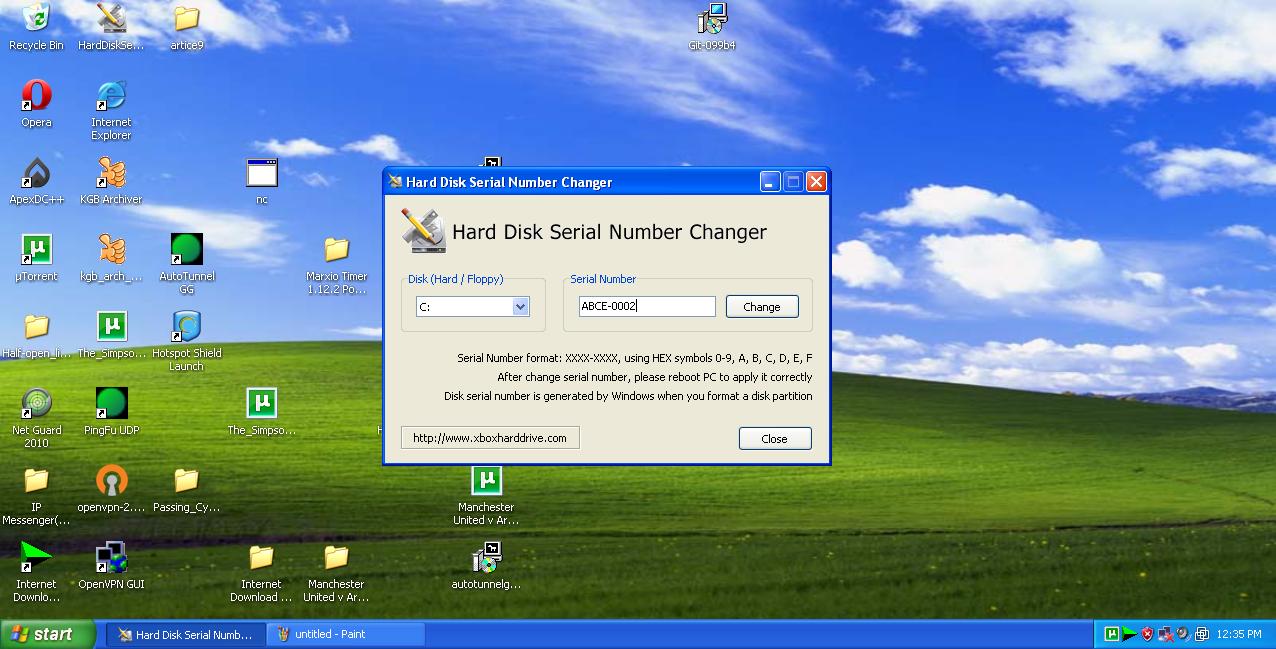
Actually hard disk serial number is a serial number assigned to the drive whenever a fresh copy of Windows OS is installed. So if PingFu has expired and you want to use it again just format your drive. Obviously formatting is tedious and time consuming, you will also have to backup all your data each time Pingfu expires which is currently 3 days! Therefore I recommend running PingFu on a virtual Windows OS (virtualbox or VMWare are good options) and installing a nifty tool called "Hard Disk Number Changer" (download link is at bottom).

Run it with admin privileges, change the number of the drive in which PingFu is installed , reboot and enter the new (bogus) registration details. Basically PingFu will think that it has been installed on a fresh copy and will allow you to use it for another trial period. It's that simple!


Download Hard Disk Number Changer
Know more about PingFu

Share

Monday, May 17, 2010

Bypass firewalls,proxy servers and unblock sites using PingFu

The earlier article about visiting blocked websites or viewing them anonymously had a few key disadvantages. First of all they can be used to websites only! So applications requiring other protocols such as torrent cannot be run using them. Secondly, dynamic webpages and elements such scripts eg javascripts are stripped off while displaying the webpages. This renders site such as rapidshare useless.php/cgi based proxy servers are helpful but most of them are blocked and the ones which are not are usually extremely slow.

Much more robust methods include use of software which completely encrypt connections of all type of protocols increasing flexibility as now even torrent based software can work. An example of such software is PingFu UDP , links are at the bottom. It is a commercial software and comes with a 3 day trial. After that you will either need to format your computer or use the hack described in the next article. Therefore I would seriously recommend using PingFu only on a virtual OS (use virtual box or VMware). Just install it and register yourself.
On the app screen you should see green light and "connected" as "client status".

To run an application simply click on Application Launcher on the sidebar and click on "Add an Application". It should now appear in "Installed Applications" column. Double clicking on the icon will  launch the application.

Upon running Opera with PingFu here is what whatismyipaddtess had to say :)


The reason for choosing PingFu is that the speed is pretty good and the software is really easy to use and very flexible. The next article will examine how PingFu manages its users and how we can play around with the software and fool it to provide us virtually unlimited number of trial days.

Note that this establishes a vpn to their server allowing you to unblock sites and letting you bypass any school or corporate firewall.

HOMEPAGE PINGFU
DOWNLOAD PINGFU
ALTERNATE DOWNLOAD LINK

Friday, May 14, 2010

Unblock banned or blocked sites using proxy servers

Our institute has installed a hardware and software based packet analyzer provided by Cyberoam which ruthlessly blocks p2p based sites, or sites containing games, spyware, hacking or adult content. There are also times when it blocks harmless,normal sites which is very frustrating.Also it has blocked the famous and even lesser known cgi proxy servers. Usually all institutes and offices install some sort of network analyzer and or blocker to disallow certain websites to prevent misuse. Here I present two ways to view blocked websites or if you want anonymity while browsing.

(Please remember that both allow only basic text and image; scripts are filtered off)

Webinmail is a service by Rediff in which it sends you requested webpages via email! On testing I found it very efficient and fast. Here is what you need to do.

Compose a mail to browse@webinmail.com with the subject as the webpage you need to view. Leave the body of the message empty and send the mail.


Within a few minutes you will receive a stripped down version of the requested page


Go to Rediff Webinmail

Aptivate an NGO working towards international IT development is working on a project called Loband which aims to reduce bandwidth consumption by displaying a "text and image only" version of the site. But it also serves our purpose of surfing web without any restriction.

Free web proxy servers are usually extremely slow and take a lot of time to load the requested webpages but here are two alternatives which almost replicate the functioning of a proxy server but are much faster. The only disadvantage is that dynamic webpages cannot be accessed.

Go to Aptivate's Homepage
Visit Project Loband
Share

Wednesday, May 12, 2010

Access many sites without account 

Although this deserves a mere mention I thought I should dedicate a page to it since it serves a very useful purpose and has saved a lot of precious time and inbox with spam. There are two ways to enter a site either you hack through it or you have a legitimate account. Sometimes we come across a site or a newsgroup which has an interesting software or document but we cant download it unless we have an account.


Bugmenot is an initiative whose main aim is to create a dedicated database of usernames and passwords of sites which "force" you to login.

You can also go there and submit username and password of any site which you feel is having unnecessary authentication. As users of the site try out your username and password they will rank it based on whether it was a success or a failure.

the link is www.bugmenot.com

Saturday, May 8, 2010

Port Forwarding to allow faster torrent downloads

If you are getting absymally low sppeds while dowloading using torrent links then this article may help you out greatly.

The torrent network is based on P2P (peer to peer) technology which means that while you are happily downloading some stuf ,someone else is simultaneously downloading from your already downloaded data. This ensures that maximum speed is achieved. But nowadays users having personal broadband connection have a router which connects them to their ISP. These router come with a prebuilt firewall which filter out incoming packets and only allow packets bound to certain ports.

Usually torrent clients such as utorrent require ports in the range of 5000 and onwards to be "opened" for peers to connect to you but the router does not allow it. While downloading a file in utorrent check whether there is a tick or a cross at the bottom bar of utorrent. If there is no signal present your internet connection is probably not working . A green coloured tick means that utorrent is working perfectly fine otherwise if there is a red cross then you will have to instruct your router to forward all the packets that it is blocking to your computer.


Port forwarding allows you to forward all the packets bound to a certain port or ip address without any hindrance from the router. Obviously to do this you would need full access to your router.

Usuallly all routers have a web server and telnet server running TO access the webserver , open your web browser and enter

192.168.1.1 , (if you get an error you have either entered a worng address or the web server is not running)

Now youll probably be asked for username and password to access the webpage:
The default usernames and passwords are generally in the form of:

admin;password
administrator;password
admin;admin
Once you have access to the web page search for the links such as Port forwarding , Virtual Severs or DMZ HOST or port triggering.

I have a beetel 440bx wireless router at home and port forwarding can be done by using the virtual servers settings.

Select the protocols as TCP&UDP and enter the port that is specified in utorrent settings for both the "Internal port end" and "External port End".

In the "Server IP address " settings enter the IP of the host computer.

Save the settings and reboot the router.


Port triggering is a newer feature in which "outbound" and "inbound" ports are specified. Now as soon as a packet leaves the router from the "outbound" port, it will instantly allow all packets in through the specified "inbound" port to that host which caused the traffic. It is not a very user-friendly technique and causes problems if your application uses a different port each time.


DMZ host basically allows the router to forward all the packets from outside to the specified IP address.

Also remember to assign your computer a static IP address so that you dont have to change settings in the router.

If the settings are entered correctly you will get a nice green tick at the bottom of u torrent

Reduce IPMSG traffic

In our college a LAN chatting/Messenger application called IPMESSENGER is pretty famous. It not only provides chatting and instant messaging facility but also supports file transfer.
It uses the UDP protocol for the the messaging and TCP for the file transfers.

Some of its unique features include:
1.It is very compact(a few KBs)
2.Does not require a server, unlike some other software.
3.Includes file transfers
4.Even though UDP(and therefore unreliable) is used, the application layer implements the TCP like features and if the message sent is not acknowledged, the software will give an error!

But there is a small problem, especially in our college where the administrator cap the bandwidth due to which the browsing does become very slow, and therefore it becomes important that we use as little bandwidth as possible and do not cause heavy traffic.

The IPmsg seems to use the Blowfish and RSA encryption which can cause the data size of simple udp datagram to increase ten-fold. On running it at my home computer a 39-bytes of data(without encryption), which contained a simple message "hi" converted to 339 bytes after encryption. On our campus the average number of students using the ipmessenger application is 250, that would mean a lot of useless traffic.

The application does not directly provide an option to turn off encryption, so you would have to do some work yourself by manually editing the registry.

a)Open regedit.
b)Go to HKEY_CURRENT_USER\Software\HSTools\IPMsgEng
c)Click on IPMsgEng on the left pane and on the right pane search for the key "EncryptNum", the default value should be 14, change that to 0.
d)Close the application and restart the computer to make sure that the registry changes have take effect.


Some important links:

1.IPmessenger home website
2.Wiki on encryption